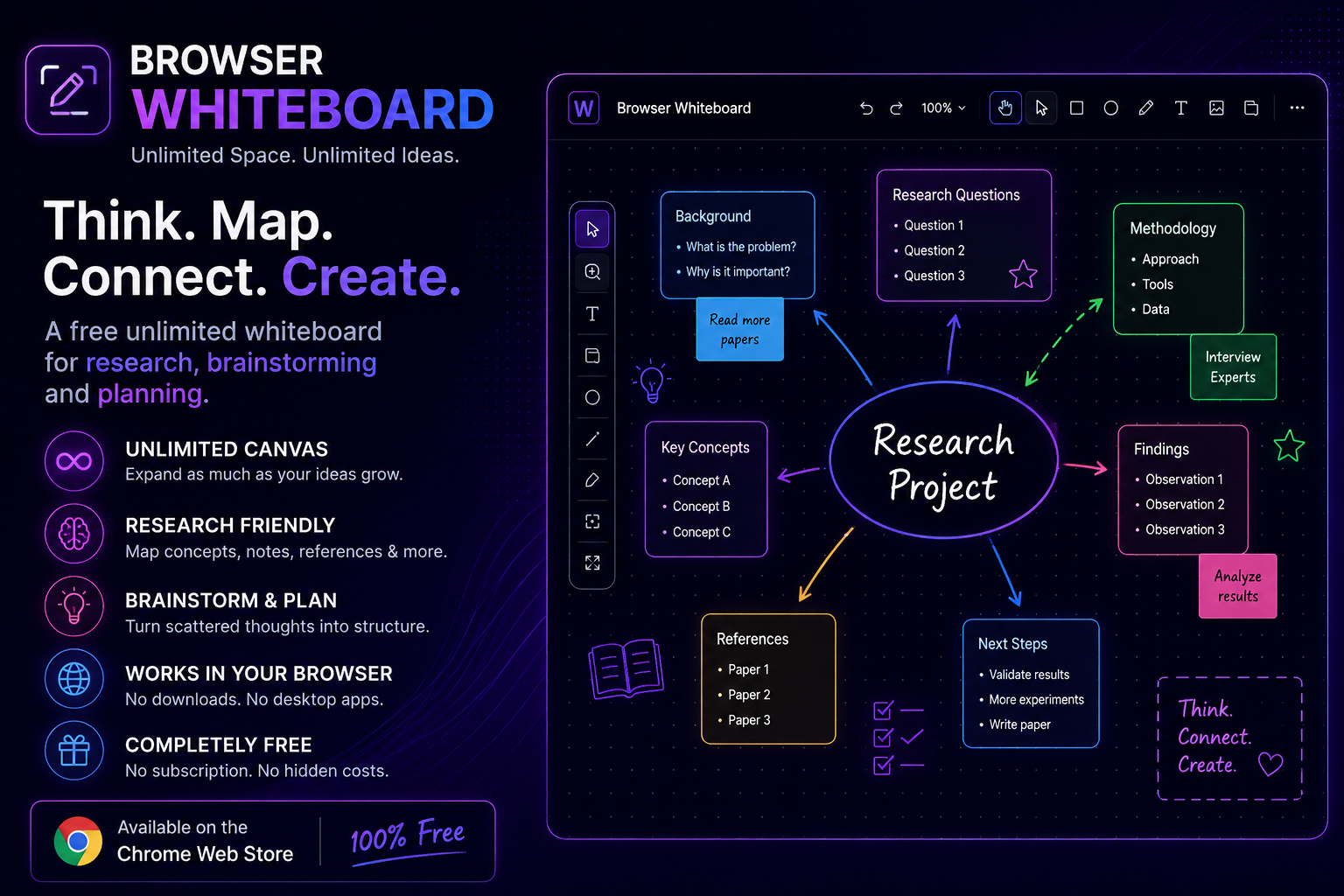
I’ve recently published a small browser-based whiteboard on the Chrome Web Store. It is a simple tool built around an idea I have found useful while working on research, technical projects, planning, and collecting ideas: sometimes it is easier to work with information when you can place it on a large visual canvas instead of keeping everything inside a sequence of documents or notes.
The whiteboard is completely free and provides an unlimited canvas that can be expanded as your work grows.
There is no particular workflow you have to follow. You can use it for brainstorming, research notes, concept mapping, project planning, diagrams, visual notes, or simply putting ideas somewhere while you are working through a problem.
You can try Browser Whiteboard on the Chrome Web Store.
Why a Browser Whiteboard?
Most of the work we do today is already browser-based.
Research papers, documentation, articles, online courses, GitHub repositories, AI tools, reference material, and many productivity applications are all accessed through a browser.
However, when we want to sketch something out or arrange information visually, we often have to move to another application.
That is not necessarily a major problem, but it can make the workflow less convenient.
A browser-based whiteboard provides a simple alternative: keep a visual workspace available alongside the other browser-based work.
The idea behind this project was not to build another large productivity platform. I wanted something more straightforward—a canvas where information can be placed, moved around, and organized visually without having to decide on a fixed page structure first.
An Unlimited Canvas for Flexible Work
A conventional document has a natural top-to-bottom structure.
That works very well when the information is already organized.
But during research or brainstorming, the structure often isn’t known at the beginning.
You may start with one topic and then discover several related topics. A reference may lead to another question. A technical problem may turn into several possible approaches.
An unlimited canvas is useful in these situations because you can keep expanding the workspace instead of trying to fit everything into a predefined area.
You might start with a single idea in the center and gradually build around it.
For example:
Main topic
→ Related concept
→ Research reference
→ Technical question
→ Possible solution
→ Follow-up idea
The layout itself can help you keep track of how these pieces relate to each other.
Using the Whiteboard for Research
Research is one of the use cases I had in mind while building the tool.
When working on a research topic, there can be a considerable amount of information that never makes it directly into the final paper or report.
There are papers to read, questions to investigate, technologies to compare, assumptions to examine, possible approaches, observations, and ideas for future work.
A visual canvas can be used as a temporary workspace for organizing all of this.
Literature and Reference Mapping
For example, you could create a section of the canvas for a particular research area and place related papers or notes around it.
You might organize them by:
- Research topic
- Methodology
- Application
- Dataset
- Technology
- Results
- Limitations
- Open problems
The purpose isn’t necessarily to create a formal literature-review database.
Instead, it provides a visual research workspace where you can see the broader picture while exploring a topic.
Connecting Research Ideas
Research frequently involves relationships between concepts.
You may discover that two papers use similar approaches, that two technologies solve related problems, or that a limitation mentioned in one study could become an opportunity for another project.
These relationships can be easier to explore visually than in a collection of separate notes.
You can place related information together and gradually create your own research map.
Useful for Students
Students can use an unlimited whiteboard for study planning, concept mapping, revision, and project work.
For a technical subject, for example, a student could start with a central topic and create branches for its principles, components, equations, applications, advantages, limitations, and examples.
Instead of maintaining several disconnected notes, the student can create a single visual overview.
It can also be useful when preparing for examinations.
A complete syllabus can be divided into topics and subtopics on the canvas. Difficult concepts can be given additional notes or examples, while topics that need further study can be marked for later review.
The whiteboard doesn’t replace conventional study notes. It can simply serve as another layer for organizing and understanding information.
A Workspace for Developers
Developers often need to understand systems before implementing them.
Even a relatively small software project can involve multiple components:
- Frontend
- Backend
- APIs
- Database
- Authentication
- External services
- Background processes
- File storage
- Deployment
A whiteboard can be useful for sketching these components and their relationships.
For example, before starting a new application, you could create a simple architecture map showing how the user interface communicates with the backend, how the backend accesses the database, and where external APIs fit into the system.
As the design changes, the elements can be moved around.
This makes the canvas useful for software architecture, feature planning, API design, debugging, and technical brainstorming.
Planning Projects and Workflows
The same approach can be applied to project planning.
Instead of immediately creating a detailed task list, you can first establish a high-level visual structure.
For example:
Project
→ Objectives
→ Workstreams
→ Tasks
→ Dependencies
→ Milestones
→ Deliverables
Additional notes can be placed around individual areas as the project develops.
This can be particularly useful during the early stages of a project when requirements are still changing.
Once the structure becomes stable, the information can then be moved into whatever project-management or documentation system you normally use.
The whiteboard is simply a flexible place to work through the structure first.
Brainstorming Without a Fixed Format
Brainstorming is another straightforward use case.
When generating ideas, it isn’t always helpful to immediately organize everything into headings and lists.
Some ideas may be related.
Others may be completely separate.
Some may eventually be discarded.
A visual canvas allows these ideas to remain separate until a relationship becomes apparent.
You can create different areas for different themes and move ideas around as your thinking develops.
This makes the tool useful for brainstorming, product ideas, content planning, business ideas, research questions, and problem-solving.
Teachers and Educators
Teachers can also use a whiteboard as a preparation or teaching workspace.
A complex topic can be mapped before turning it into lecture slides or structured notes.
For example, an engineering topic could be organized around:
Fundamentals → Components → Working Principle → Analysis → Applications → Limitations
Each area can then be expanded with examples, diagrams, questions, and supporting information.
It can also be useful for curriculum planning, project supervision, student discussions, and preparing explanations for difficult concepts.
Why Make It Free?
The decision to release the whiteboard for free was intentional.
This is a relatively focused utility rather than a large productivity platform. I wanted people to be able to install it, try it, and decide for themselves whether the workflow is useful.
There is no subscription and no paid plan required to use the basic whiteboard.
The project is also an opportunity to learn from actual usage.
There are always things that seem obvious while developing a tool but turn out to be less useful—or things users want that weren’t considered initially.
That makes feedback particularly useful for a small project like this.
What I Would Like to Improve
The current release is intentionally simple.
Rather than adding a large number of features immediately, I would prefer to understand how people actually use the canvas.
For example, different users may have very different requirements.
A researcher may want better ways to organize references.
A student may want study-oriented features.
A developer may want more diagramming capabilities.
A teacher may want presentation or classroom-oriented workflows.
Someone using it for general brainstorming may want something completely different.
So I am interested in practical feedback rather than simply adding features for the sake of making the feature list longer.
If you use the whiteboard and find something confusing, inconvenient, missing, or unnecessary, I would be interested in hearing about it.
Try the Browser Whiteboard
The Browser Whiteboard is now available through the Chrome Web Store.
You can find it here:
Open Browser Whiteboard on the Chrome Web Store
It is free to use, works directly in the browser, and provides an unlimited canvas for visual work.
If you regularly do research, brainstorming, project planning, visual note-taking, or concept mapping, it may be worth trying.
And if you do use it, feedback would be very welcome.
Small tools often improve through small, practical suggestions from people who use them differently from the original developer.
Final Thoughts
The goal of this project is fairly simple.
There are many situations where I don’t want to write a finished document yet. I just want somewhere to put ideas, move them around, group them, and see how they relate.
An unlimited canvas provides that kind of intermediate workspace.
It can sit somewhere between a blank sheet of paper and a structured productivity application.
You can start without knowing exactly what the final structure will be.
You can keep expanding the canvas as the subject becomes more complicated.
And when the thinking is finished, the resulting structure can become the basis for a document, presentation, project, research paper, application, or simply a better understanding of the problem.
That is the purpose of this release.
If that sounds useful for the way you work, give it a try and let me know what you think.
Frequently Asked Questions
1. What is Browser Whiteboard?
Browser Whiteboard is a browser-based visual workspace with an unlimited canvas. It can be used for research, brainstorming, planning, diagrams, concept maps, visual notes, and organizing ideas.
2. Is Browser Whiteboard free?
Yes. Browser Whiteboard is completely free. There is no subscription or paid plan required to use it.
3. Who can use the whiteboard?
It can be useful for students, researchers, developers, teachers, designers, entrepreneurs, and anyone who prefers working with information visually.
4. How can I use it for research?
You can use the canvas to organize research questions, concepts, papers, references, observations, methodologies, technical approaches, and open problems. The spatial layout can help you see relationships between different parts of your research.
5. Can it be used for project planning?
Yes. You can use it to map project objectives, workstreams, tasks, dependencies, milestones, ideas, and deliverables. It is particularly useful during the early planning stage when the project structure is still evolving.
6. Where can I get Browser Whiteboard?
The extension is available on the Chrome Web Store.
Get Browser Whiteboard and try it for your own research, projects, ideas, and visual work.