If you regularly work with data on the web, you’ve probably encountered this situation.
You find a useful table on a website—perhaps product specifications, financial information, research data, pricing comparisons, sports statistics, or technical documentation—and you need that data in Excel or another application.
Unfortunately, copying a table from a browser isn’t always straightforward.
Sometimes the formatting breaks. Columns become misaligned. Hidden elements get copied. Large tables become difficult to manage, and cleaning the data often takes longer than extracting it.
That’s why I built Table Grabber.
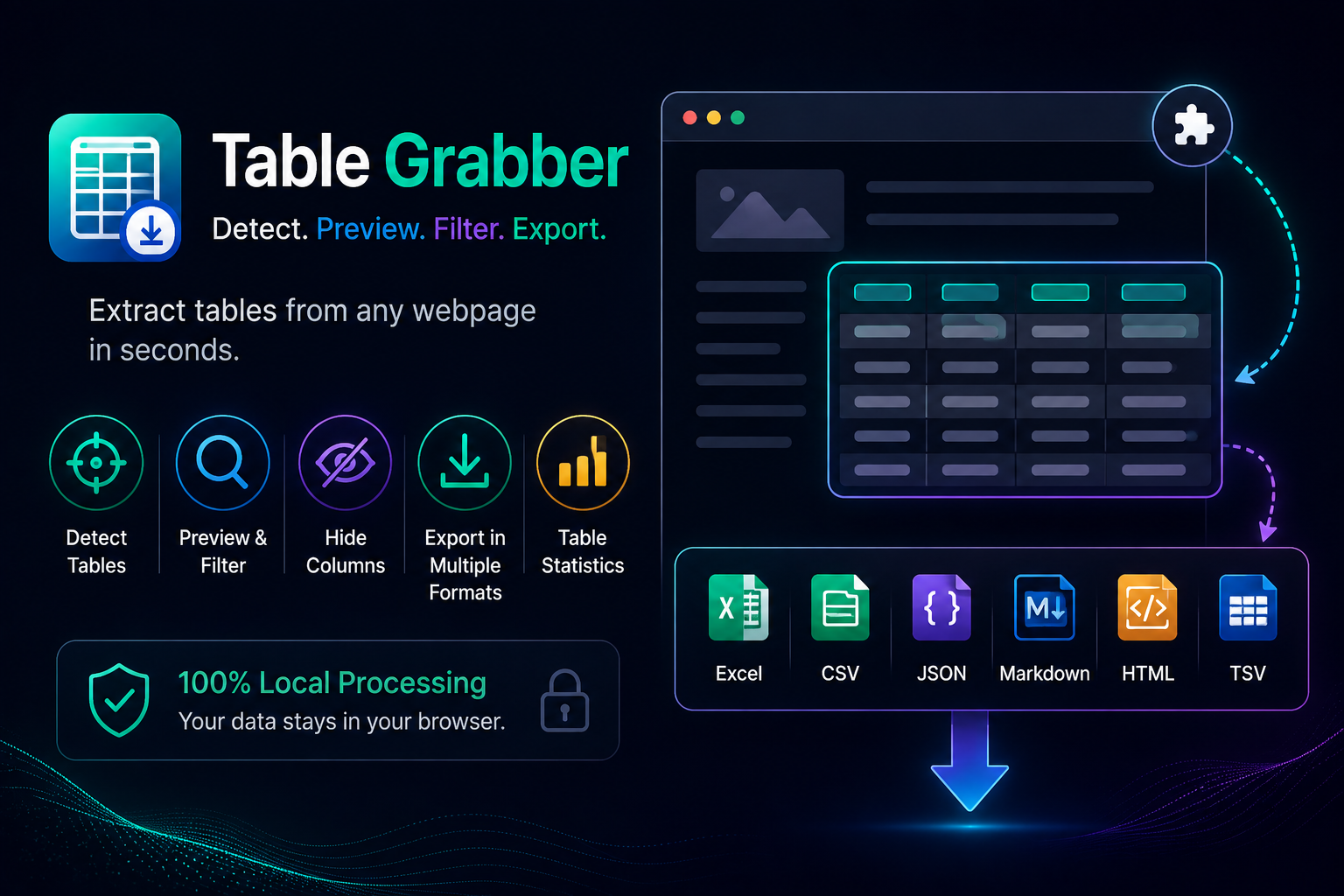
Table Grabber is a Chrome extension that detects HTML tables on the current webpage, lets you preview the data before exporting, and allows you to export it in multiple formats—all while keeping everything local inside your browser.
The Problem with Copying Web Tables
Web pages are designed for reading, not for exporting data.
Even when a webpage displays a perfectly formatted table, extracting it usually involves one of these approaches:
- Copy and paste into Excel, hoping the formatting survives
- Manually recreate the table
- Save the page and clean it afterward
- Use an online conversion service
- Write custom scripts to scrape the data
Each approach has drawbacks.
Simple copy-paste often produces inconsistent results. Online tools require uploading webpage content to third-party servers. Custom scripts are powerful but unnecessary for occasional data extraction.
For many users, they simply need a quick and reliable way to move tabular data from a webpage into their preferred tools.
What Table Grabber Does
Table Grabber focuses on one task:
Extract HTML tables from webpages quickly and accurately.
When activated, the extension detects tables on the current webpage and presents them in a clean interface where you can inspect the data before exporting.
No complicated setup.
No external services.
Just select the table you need and export it.
Preview Before You Export
Not every webpage contains just one table.
Some pages include navigation tables, comparison tables, pricing grids, statistics, or hidden data.
Table Grabber detects each table individually so you can choose exactly which one you want.
Before exporting, you can preview the data to ensure you’ve selected the correct table.
This small step helps avoid unnecessary exports and makes working with complex pages much easier.
Search and Filter Rows
Large datasets are easier to work with when you can quickly locate the information you need.
Table Grabber includes built-in search and filtering, allowing you to inspect tables before exporting them.
Instead of exporting hundreds of rows and filtering them later, you can first verify the content directly inside the extension.
Hide Columns Before Export
Sometimes a webpage contains columns you don’t actually need.
Rather than exporting everything and deleting unwanted columns afterward, Table Grabber lets you hide columns before exporting.
This keeps exported files cleaner and reduces the amount of post-processing required.
Export in Multiple Formats
Different workflows require different formats.
Table Grabber supports exporting to:
- Microsoft Excel (.xlsx)
- CSV
- JSON
- Markdown
- HTML
- TSV
Whether you’re preparing spreadsheets, documentation, reports, developer resources, AI prompts, or importing data into another application, you can choose the format that best fits your workflow.
Batch Export Multiple Tables
Many webpages contain several related tables.
Instead of exporting them individually, Table Grabber can combine multiple tables into a single Excel workbook.
This is particularly useful when collecting information from documentation sites, reports, product catalogs, or statistical datasets.
View Table Statistics
Before exporting, Table Grabber also provides useful information about the detected table, including:
- Number of rows
- Number of columns
These statistics provide a quick overview of the dataset and help verify that you’ve selected the correct table.
Everything Stays on Your Computer
Privacy was an important consideration while building Table Grabber.
The extension processes tables entirely within your browser.
- No data is uploaded.
- No external servers are contacted.
- No accounts are required.
- No cloud processing takes place.
The extension works only on the active webpage you choose, making it suitable for users who prefer local processing.
Who Is Table Grabber For?
Table Grabber is useful for anyone who regularly works with web-based tables, including:
Researchers
Collect datasets from reports, journals, and public resources.
Students
Extract tables from educational websites and reference materials.
Developers
Copy structured data into JSON, Markdown, or HTML for development and documentation.
Analysts
Move pricing tables, comparison charts, and structured datasets into Excel for further analysis.
Content Creators
Reuse publicly available tabular information in articles, reports, or documentation with minimal effort.
A Simple Tool for a Common Task
There are many powerful scraping tools available, but sometimes they are more than you need.
Table Grabber was designed for a straightforward purpose:
- Detect tables.
- Preview the data.
- Export it in the format you need.
If extracting tables from webpages is something you do regularly, even a small reduction in manual work can save considerable time over the course of a week.
I hope Table Grabber makes that process a little easier.